
You can change a link's destination and any of its settings at any time, without the short link changing. That's ideal when you've already printed the link or its QR code.
- Open Link Management → Links.
- Click ⋯ on the right of the link and choose Edit.
- Change what you want.
- Click Update Link.
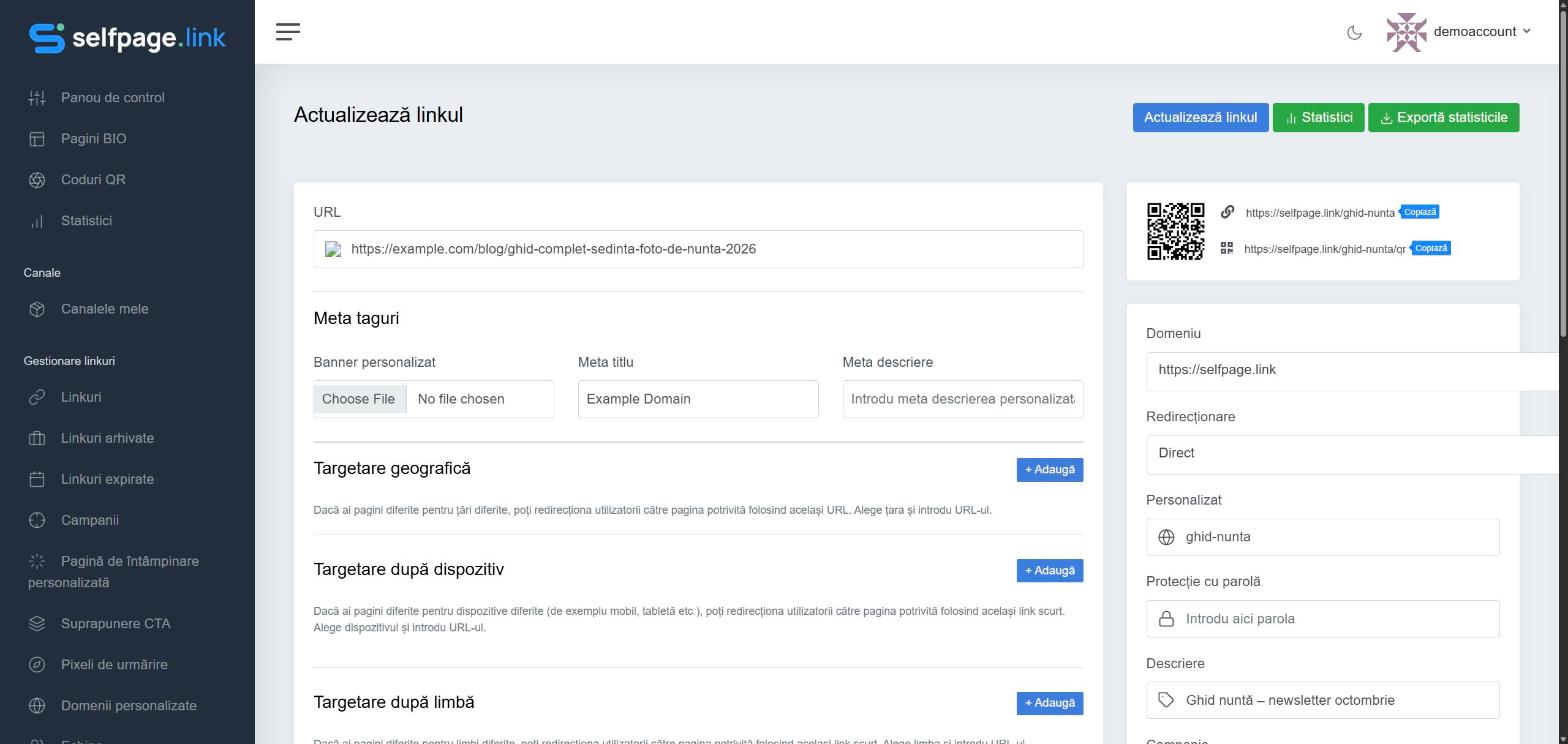
What you can change
- URL – the destination address.
- Meta Tags – banner, title and description for the preview on social networks. See the link preview
- Geotargeting, Device Targeting and Language Targeting – see redirecting based on the visitor
- Expiration – see link expiration
- A/B Testing & Rotator, Targeting Pixels, Parameter Builder.
- On the right: Domain, Redirection, Custom (the alias), Password Protection, Description, Campaign and Channels.
Also on the right you'll find the short link and its QR code version (the link followed by /qr), each with a Copy button. The Statistics and Export Stats buttons at the top take you straight to the link's data.
Warning: if you change the alias or the domain, the old short link stops working.