
The Settings tab of the bio page editor holds the options for search engines, privacy and marketing.
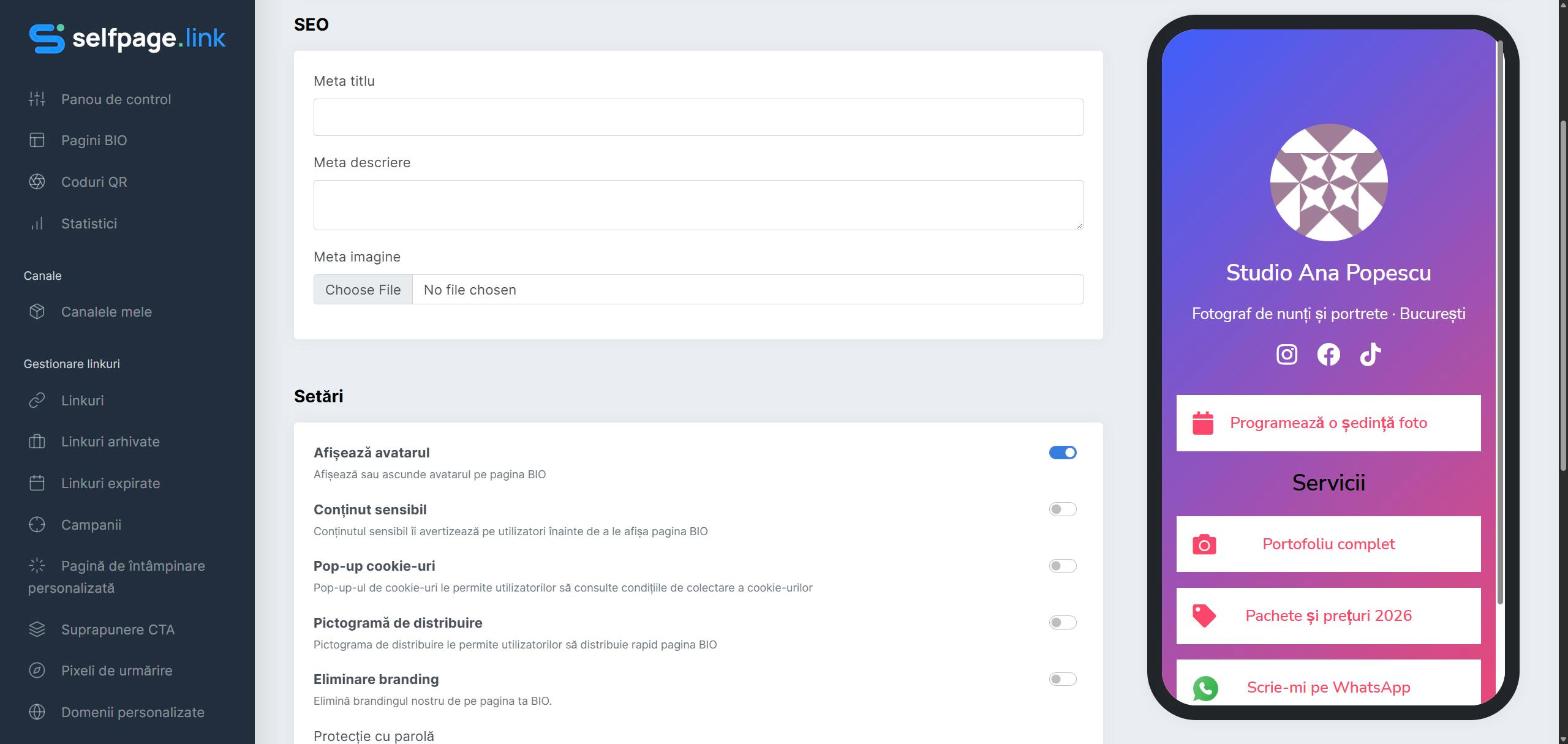
SEO
- Meta Title – the title shown in Google and in the browser tab.
- Meta Description – the short text shown under the title in search results and when you share the link.
- Meta Image – the image shown when the page link is shared on Facebook, WhatsApp, LinkedIn and so on.
Settings
- Display Avatar – show or hide the profile photo.
- Sensitive Content – visitors see a warning before entering the page.
- Cookie Popup – shows a message where visitors can read how cookies are collected.
- Share Icon – adds a button visitors can use to share the page quickly.
- Remove Branding – hides the Selfpage mention at the bottom of the page. Available only on plans that include this feature.
- Password Protection – only people who know the password can see the page. Leave the field empty to remove the password.
- Targeting Pixels – choose the pixels (Facebook, Google, TikTok and more) that load on every visit, for remarketing and conversion tracking. The pixels have to be created first under Tracking Pixels – see How do I add a tracking pixel?
Custom CSS
For advanced users: add CSS rules that apply only to your page, for example .btn { letter-spacing: 1px }. If something stops looking right, clear the field to go back to the theme's design.