
With your own domain (for example studioana.com or go.company.com), your short links and bio page carry your brand name instead of selfpage.link. Setting it up takes two steps: configuring DNS at your domain provider and adding the domain to your account.
1. Configure your domain's DNS
Log in to the provider where you bought the domain (for example GoDaddy, Namecheap, Cloudflare) and, in the DNS settings:
- for a root domain (
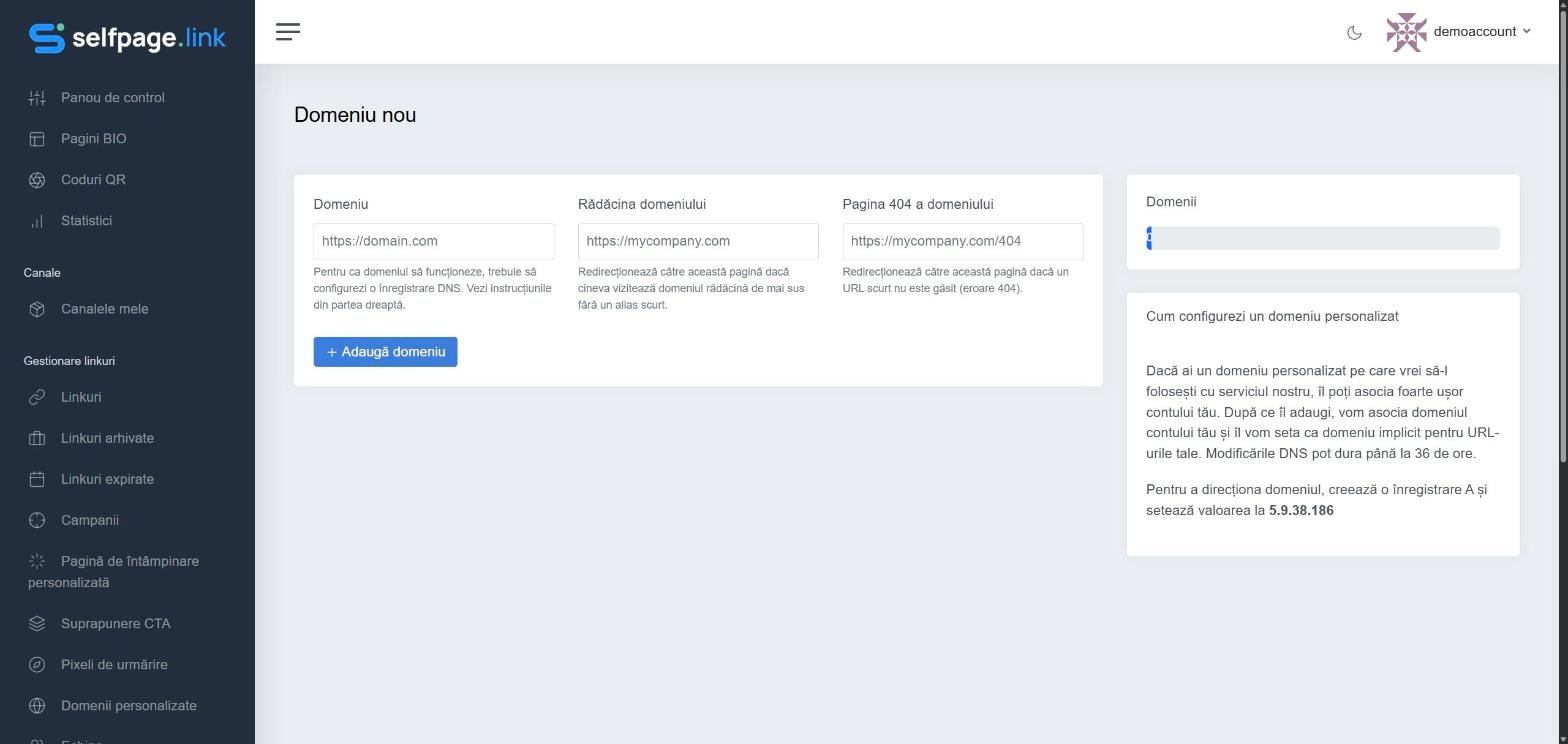
studioana.com): create an A record with the value shown on the New Domain page in your account (currently5.9.38.186); - for a subdomain (
go.company.com): follow the CNAME instructions shown on the same page, if available, or use an A record with the same value.
Delete any other A or AAAA records for the same name, so they don't conflict.
2. Add the domain to your account
- Open Link Management → Branded Domains and click Add Domain.
- In Domain, type the full address, with
https://(for examplehttps://studioana.com). - Optionally, in Domain Root, choose where people go when they visit the domain without any alias (for example your main website).
- Optionally, in Domain 404, choose where people go when they open a short link that doesn't exist.
- Click Add Domain.
Domain status
- Pending DNS – the DNS changes haven't propagated yet. Propagation can take up to 36 hours.
- Active – the domain works and can be used.
- Inactive/Disabled – the domain can't be used at the moment; check your DNS settings or contact us.
Use the domain
- when creating a link, choose the domain from the Domain list;
- for a bio page, choose the domain under Bio Page Alias, in the editor's Content tab;
- for dynamic QR codes, choose the domain when creating them;
- to have it used everywhere automatically, set it as your Default Domain in Settings.
SSL (https): for the domain to work securely over
https://, we recommend managing it through Cloudflare. If you run into problems, contact us.
Limits and offer: the number of domains depends on your plan. On the Online Business plan with yearly billing you also get a free .BIO domain.